
Fire inspection software that tracks every device and every due date

Fire Alarm, Sprinkler, Fire Suppression and Emergency Lighting come set up as system types. Barcode every device, match each inspection clock to your NFPA program, and post results to the customer portal.

4 fire system types ready by default Included in every plan iOS & Android
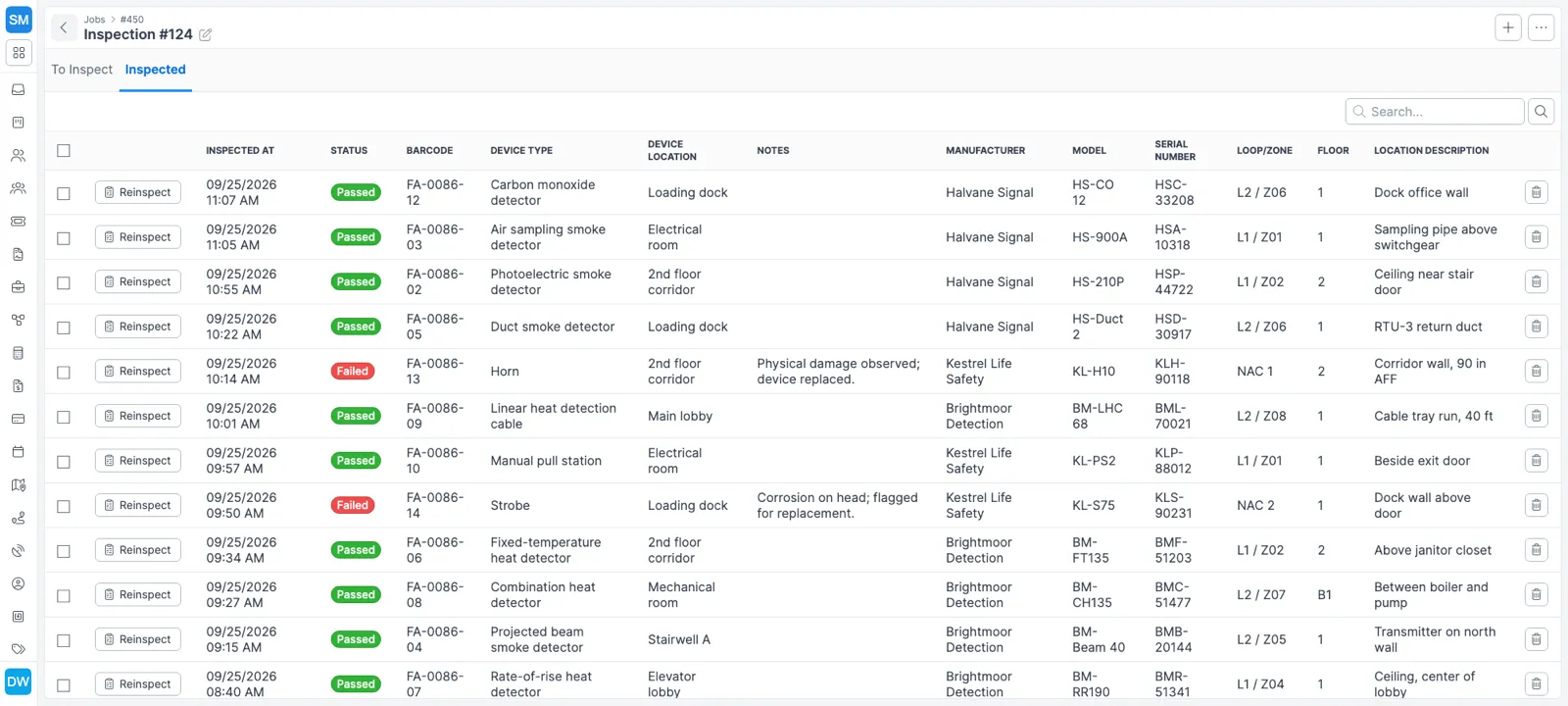
Forz Inspection #124 for a fire alarm system, Inspected tab: 14 devices barcoded FA-0086-01 to 14 with Passed or Failed results, notes on the two failures, manufacturer, model, serial number and loop/zone
The Inspected tab of a fire alarm inspection: every device's result, the note behind each Fail, and the manufacturer, model and serial number saved on each device.

The problem with the old way

A two-tool stack for one workflow

Inspections live in one app, work orders and invoices in another. Even with an integration between them, you're paying for two systems, training your staff on both, and reconciling data between them.

Due dates tracked in spreadsheets

A single site can carry hundreds of devices on different frequencies: monthly visuals, annual functionals, 5-year internals. One missed cell in a spreadsheet is a compliance failure with your name on it.

Paper reports that stall billing

When results come back on paper, someone in the office retypes them before the customer sees a report or an invoice goes out. Days pass between the test and the bill.

How fire inspection software works in Forz

Fire system types ready by default

Fire Alarm, Sprinkler, Fire Suppression and Emergency Lighting are the default system types, each with its own custom fields for inspection data. Add more types when your contracts cover other equipment.

Every pull station, detector and head barcoded

Register devices under each system with a barcode such as FA-PU-101 or SPR-3F-042 (unique within the system), a device type and a location like 3rd Floor East Corridor. Device templates speed up installations you repeat.

Inspection clocks that match your NFPA program

Give each device type the inspection types your program requires, each on one of 12 frequencies from weekly to every 7 years. A pull station can carry a monthly visual and an annual functional test, each with its own due date.

Pass, Fail, or Bypass with photo evidence

Technicians record each device's result in the mobile app and attach a photo, even without a signal in a basement or mechanical room. Bypass documents a device taken out of service on purpose, with a note or photo of the reason.

Deficiencies routed to a repair quote

A Fail result marks a device that needs follow-up. Quote the repair with an estimate, let the customer accept it in the portal, then convert it to a job that carries the customer, site, system and line items over.

Inspection reports in the customer portal

Customers open the Inspections tab to see Pass, Fail or Bypass for each device and download a PDF report. For deliverables on your letterhead, custom documents build branded templates with merge fields that pull in record data.

Recurring inspection visits and billing

Recurring jobs generate an Inspection job every 3 months, every 6 months or yearly, with labor and parts line items attached. A recurring invoice linked to the same system drafts each bill up to 5 days before its date.

Qualified technicians on every system

Tag technicians with skills such as Fire Alarm Level 2 and keep their certificates on their profiles. Schedule suggestions only propose technicians who hold every skill the job requires.

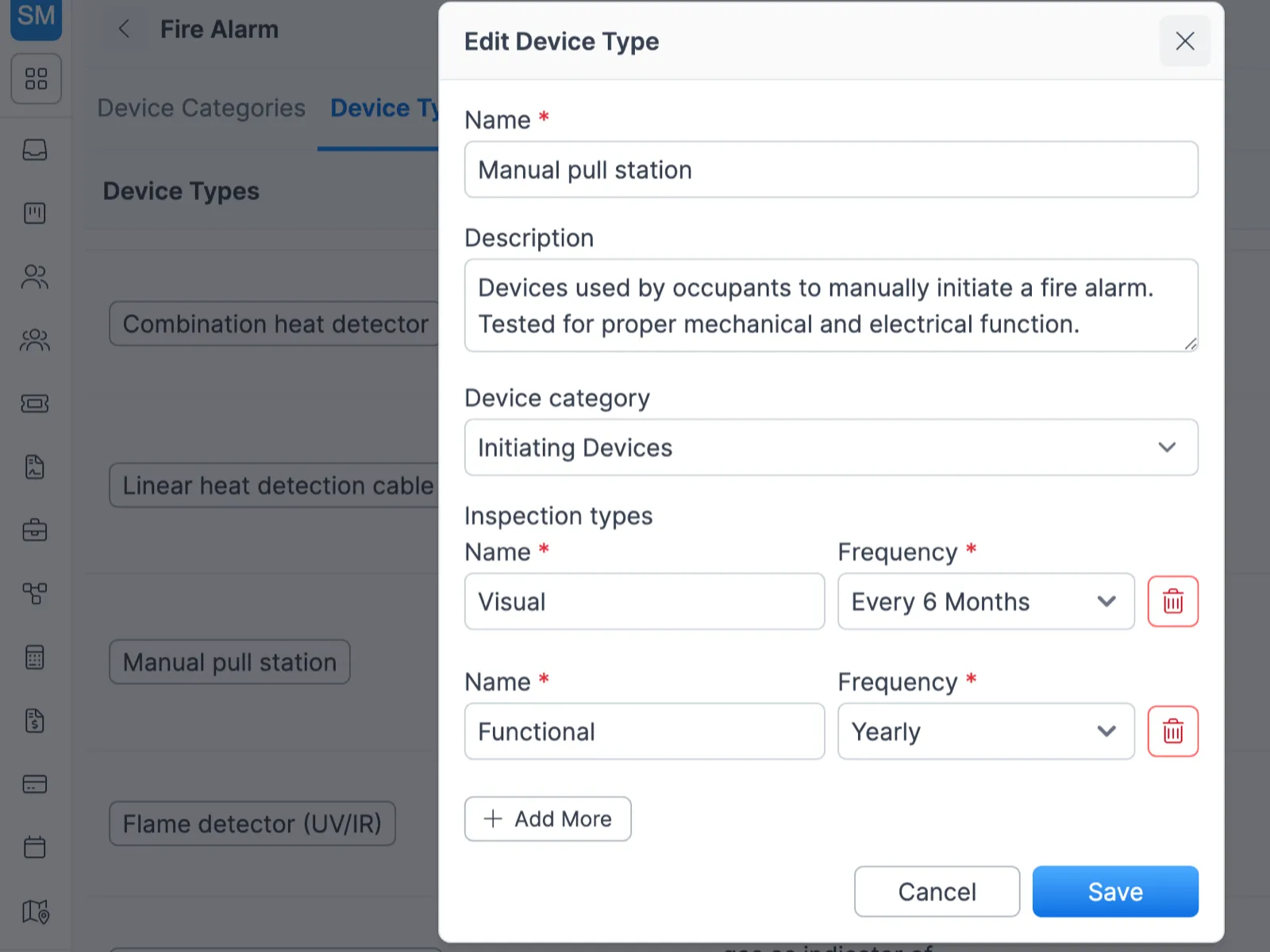
Edit Device Type modal for Manual pull station in the Fire Alarm system type, with two inspection types: Visual every 6 months and Functional yearly
Each device type carries its own inspection types and frequencies, here a semiannual visual and an annual functional test for pull stations.
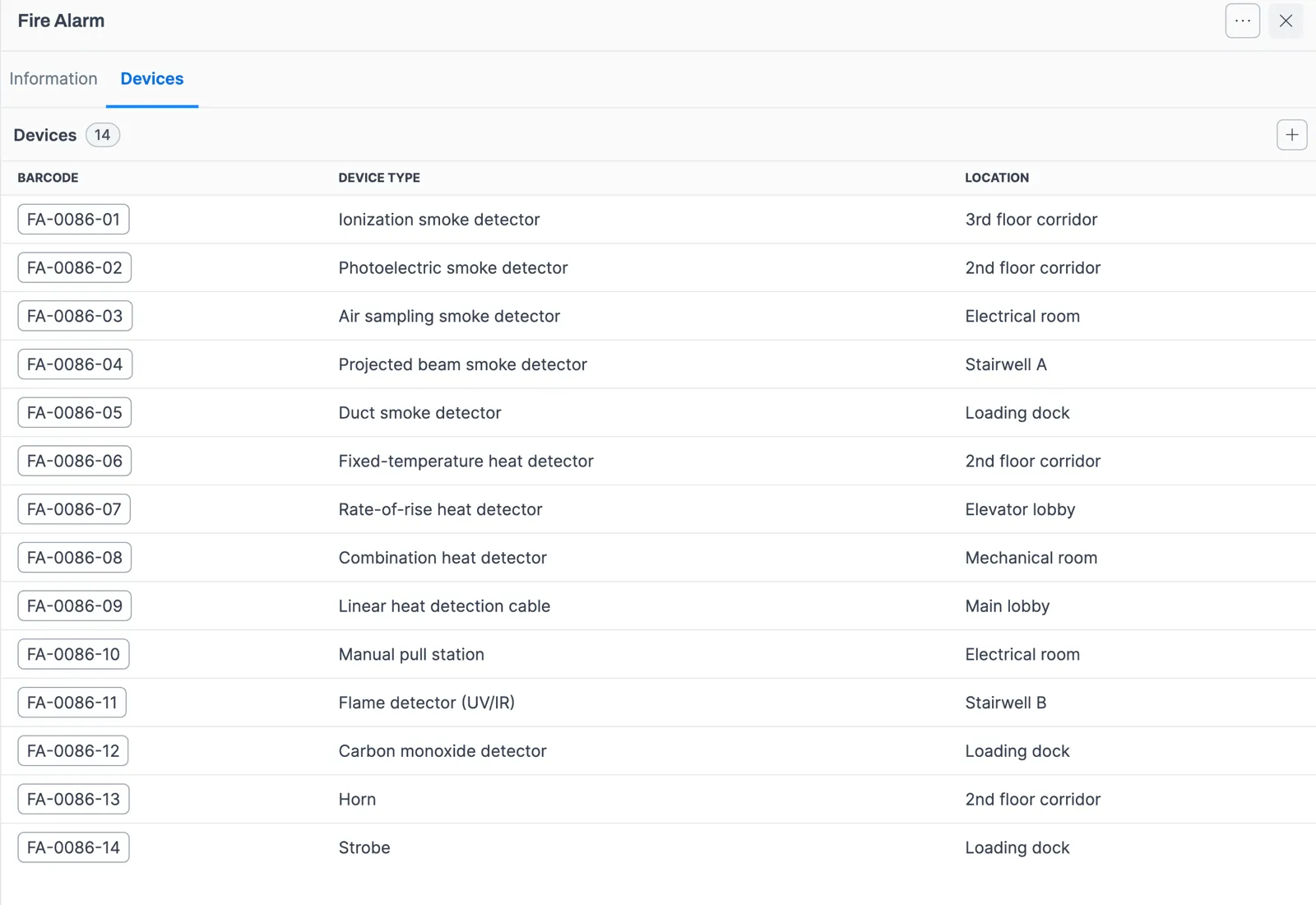
Fire Alarm system Devices tab listing 14 barcoded devices (smoke, heat, flame and CO detectors, pull station, horn and strobe) with the location of each one
A fire alarm system's device registry: barcode, device type and where each device is installed.

Built around how fire work is organized

Forz models a fire contract the way your technicians walk it. A customer has one or more sites, each site has its systems, and each system holds its devices. A university with 15 buildings becomes one customer with 15 sites, and each building gets its own fire alarm system, inspection schedule and contacts.

The system type decides which devices can exist. A Fire Alarm system type might offer Pull Station, Smoke Detector and Horn/Strobe device types. A sprinkler contractor can number heads by floor and sequence (SPR-1-001, SPR-1-002, SPR-2-001) so a barcode tells the technician where to look.

Mapping NFPA cadences to Forz frequencies

Forz does the date math. You decide the intervals, based on the edition and amendments your jurisdiction enforces. Some common examples from our NFPA 25 and NFPA 72 frequency charts:

TaskTypical intervalForz frequency
Dry pipe and preaction gauges, visual (NFPA 25)WeeklyWeekly
Wet pipe gauges, visual (NFPA 25)MonthlyMonthly
Mechanical waterflow alarm devices (NFPA 25)Quarterly testQuarterly
Manual pull stations (NFPA 72)Semiannual visual, annual testSemi-annual plus Annual
Dry pipe valve full-flow trip test (NFPA 25)Every 3 yearsEvery 3 years
Internal pipe assessment (NFPA 25)Every 5 yearsEvery 5 years
Portable extinguisher internal exam (NFPA 10)Every 6 yearsEvery 6 years

Each frequency is a fixed day count from the day a result is saved: monthly is 30 days, annual is 365 days. Forz calculates due dates for intervals up to 7 years. For longer ones, such as sprinkler sample retests or 12-year hydrostatic tests, keep the date in a date custom field on the device. Your authority having jurisdiction (AHJ) may require shorter intervals than any chart. For extinguishers, see the NFPA 10 inspection checklist.

An inspection visit, step by step

  1. A recurring job generates the quarterly Inspection job for the building, with labor and standard parts already on it. The dispatcher schedules a technician who holds the required skill.
  2. On site, the technician opens each device in the mobile app and records Pass, Fail or Bypass, with a photo where your protocol calls for one. The app keeps working in a riser room or basement and syncs when it reconnects.
  3. Each saved result moves that inspection type’s due date forward by its frequency.
  4. A Fail result becomes a repair estimate. The customer accepts it in the portal, and the office converts it to a job for the same system. For the sales side of deficiency follow-up, see our guide to the fire protection sales process.
  5. The customer downloads the inspection PDF from the portal. The contract’s recurring invoice arrives as a draft for review on its own schedule.

Common fire protection scenarios

Initial survey of a new building

A technician surveying a commercial building opens the survey job, goes to the fire alarm system and adds each device as they find it: scan the label (FA-SD-201), choose Smoke Detector, and enter the location (2nd Floor, Suite 201, above entrance). When the survey ends, every device already has its first due dates.

Monthly pull station inspections

For each pull station, the technician checks that it is in good condition and accessible, selects Pass or Fail, attaches a photo and saves. The next monthly due date is set 30 days from that day.

A quarterly contract with a hospital

A recurring invoice set to every 3 months carries line items for extinguisher inspection, sprinkler system check and emergency lighting test. A matching recurring job generates the visit on the same cycle.

Moving off paper? The NFPA 25 sprinkler inspection checklist, NFPA 72 fire alarm inspection form and fire extinguisher inspection log list the items worth turning into checkbox fields on your device inspections.

Works with the rest of Forz

Setting it up? The Systems settings and Inspections guides walk through each screen.

Frequently asked questions

Each device type carries its inspection types and frequencies. Forz sets the first due dates when a device is created and moves each one forward whenever a result is saved, so a pull station can hold a monthly visual and an annual functional test on separate clocks. Recurring jobs generate the inspection visits on your contract's cadence. Required frequencies vary by system, code edition and jurisdiction, so confirm what your authority having jurisdiction (AHJ) enforces before you configure them.

Yes. You add inspection types to each device type and pick a frequency for each, such as weekly, monthly, quarterly, semi-annual, annual, or every 2, 3, 4, 5, 6 or 7 years. That covers the weekly through 5-year intervals that NFPA 25 and NFPA 72 commonly use, and the 6-year internal exam in NFPA 10. Intervals longer than 7 years, such as sprinkler sample retests, can be kept in a date custom field on the device.

The technician records Fail, which flags the device for follow-up, and can attach a photo of the problem. The office quotes the repair with an estimate, and the customer can accept it in the customer portal. The accepted estimate converts to a job with the customer, site, system and line items copied over.

Yes. Bypass is one of the three inspection results, next to Pass and Fail. Use it when a device is intentionally taken out of service, such as a smoke detector covered during a renovation, and add a note or photo that documents the reason.

Through the Customer Portal, where customers sign in with a 6-character one-time code sent to their email, so there is no password to manage. The dashboard lists inspections from the last 30 days, the Inspections tab lists all of them, and each one shows the result for every device with a PDF report to download. For reports on your letterhead, custom documents let you build branded templates with merge fields.

No. In Forz the device registry and inspection results sit on the same jobs your office schedules, dispatches and invoices, and technicians use one iOS and Android app for inspections, photos, signatures and clocking in. Every module is included in every plan, and you switch modules on or off in Settings > Modules.

Yes. Add a skill such as Fire Alarm Level 2 in Settings > Skills, tag the technicians who hold it, and require it on the job. Schedule suggestions then only propose technicians with that skill, and route optimization only places the job on a route that covers it. Upload each technician's certificates to their profile so the proof is on file.

See fire inspection software in action

Get a 30-minute personalized demo and watch how it works on your own workflows.

Free standard data import Free 30-minute demo, no commitment