Everything your team needs, all included.
Every capability below is included in every Forz plan, with no add-on modules or feature gates.

- features
- 21 features
- included in every plan
- 100% included in every plan
- add-on modules to buy
- 0 add-on modules to buy
Scheduling & field operations
Put the right technician on each job, plan the day's routes, track shift hours with GPS clock-in, and give the field an app that works without a signal.
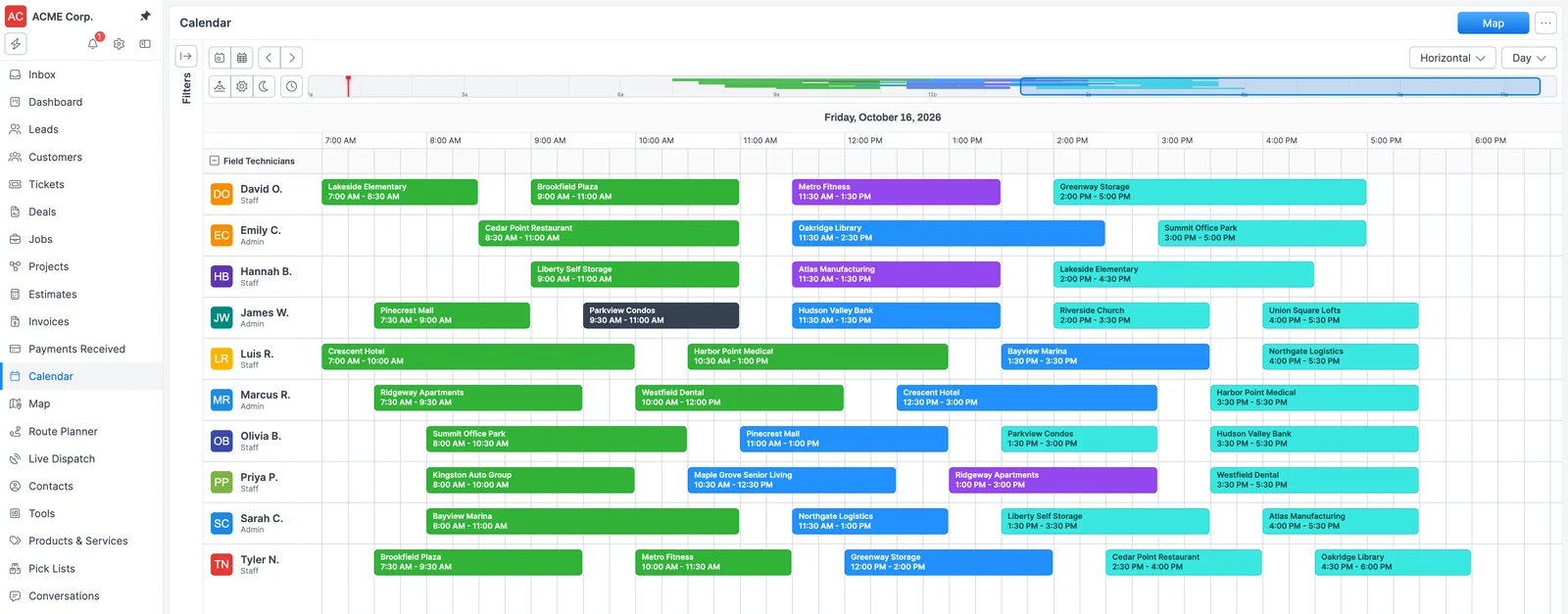
- Scheduling & Dispatch A drag-and-drop team calendar with day, week, month and list views, AI schedule suggestions that rank the best technician and time slot for each job, skills matching, and recurring jobs that Forz generates on schedule.
- Route Planning Build one route per technician or crew, add the day's jobs to a plan, and let Smart Dispatch order the stops around travel, time windows, skills, and shift capacity. Then review the whole day on a map before anyone rolls.
- Mobile App iOS and Android apps with offline access and auto-sync put photo capture, digital signatures, and on-site inspection results in every technician's pocket, with or without a signal.
- Time Tracking Technicians clock in and out from the Forz app or the web app, with GPS captured at each event. The office closes forgotten shifts, books time off, and approves each week in Timesheets before payroll.
Day view: every technician's jobs side by side, colored by status.
Jobs, projects & agreements
Run every work order through your own statuses, group multi-visit work into projects, and keep recurring service contracts on schedule.
- Work Orders Templates pre-fill the details, statuses match how your shop runs, When-If-Then automation moves each work order along, and an Unbilled list catches finished work that hasn't been invoiced.
- Project Management Group multi-visit work into a project with its own jobs, tasks, purchase orders, time logs, expenses, and invoices. Track tasks on a board, apply task templates, and see billed, paid, and outstanding amounts in one place.
- Service Agreements Define the visit schedule and the billing schedule once. Forz generates each job and each draft invoice on its own cycle, and every covered device keeps its own inspection due date, so contracted work never slips.
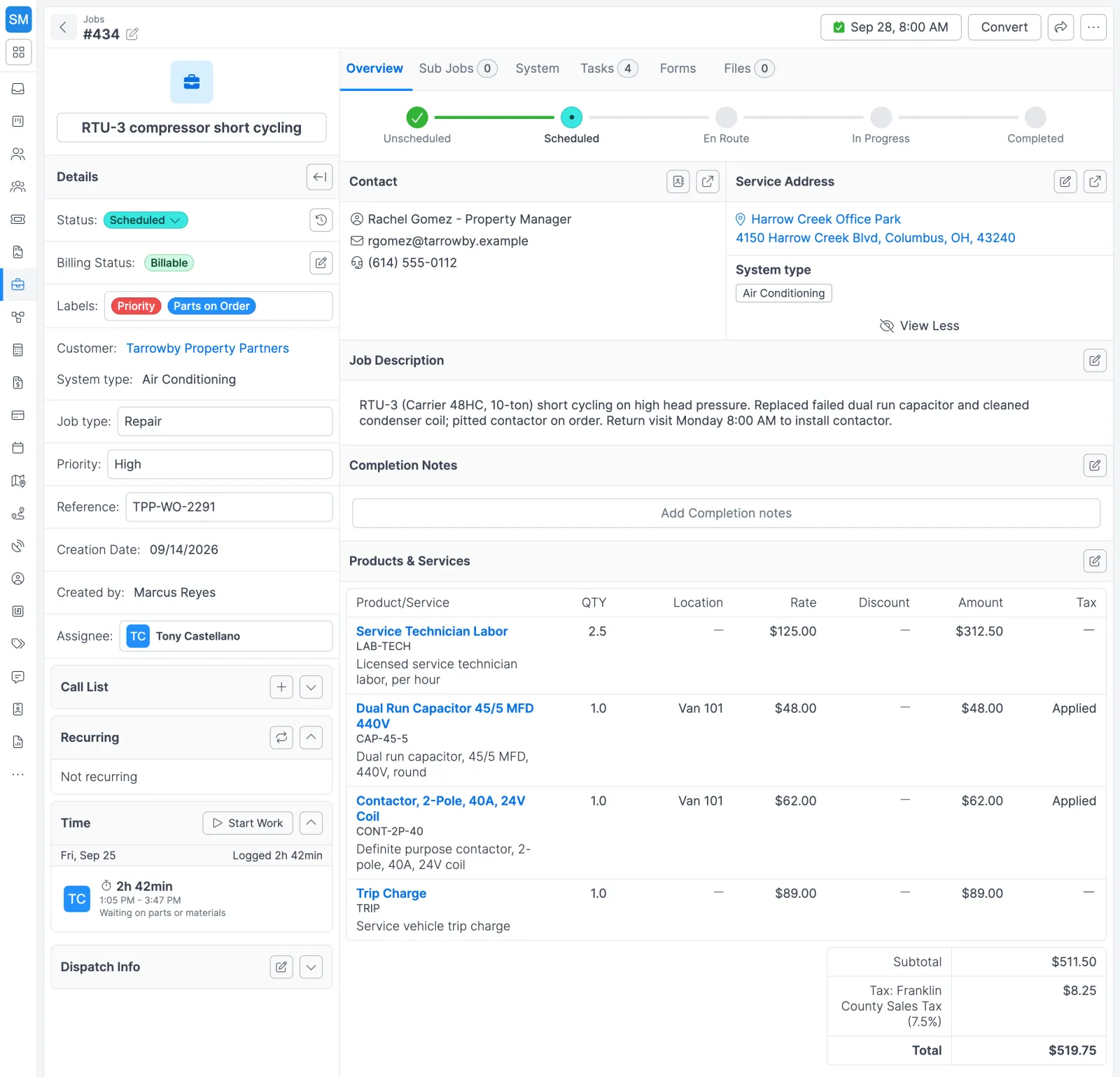
A job with its status tracker, contact, parts pulled from van stock, labor and total.
Sales & customers
Keep customers, sites and contacts in one record, win work with estimates and a leads pipeline, and give customers a portal, online booking and two-way texting.
- Field Service CRM Move leads and deals through your own pipeline stages, convert a won lead into a customer in one click, and keep every building, contact, job, estimate and invoice on the record your dispatchers already use.
- Estimates & Quotes Build line-item estimates, send customers a secure link to accept without a login, and convert won quotes into jobs with every line item carried over, so nobody retypes the scope.
- Customer Communication Text and email customers from threaded conversations your whole office can see, review recorded calls with a transcript and a 2–3 sentence AI summary, and send estimates and invoices with templates that fill in the details.
- Online Booking Share a public service request form or turn on requests in your Customer Portal. Customers choose a job type and an arrival window, confirm their email, and Forz puts the visit on a technician's calendar.
- Customer Portal Your portal lives at cp.forz.io. Customers sign in with a 6-character email code to accept estimates, check job status, download inspection PDFs and request service. They pay invoices online from the portal or the emailed invoice link.
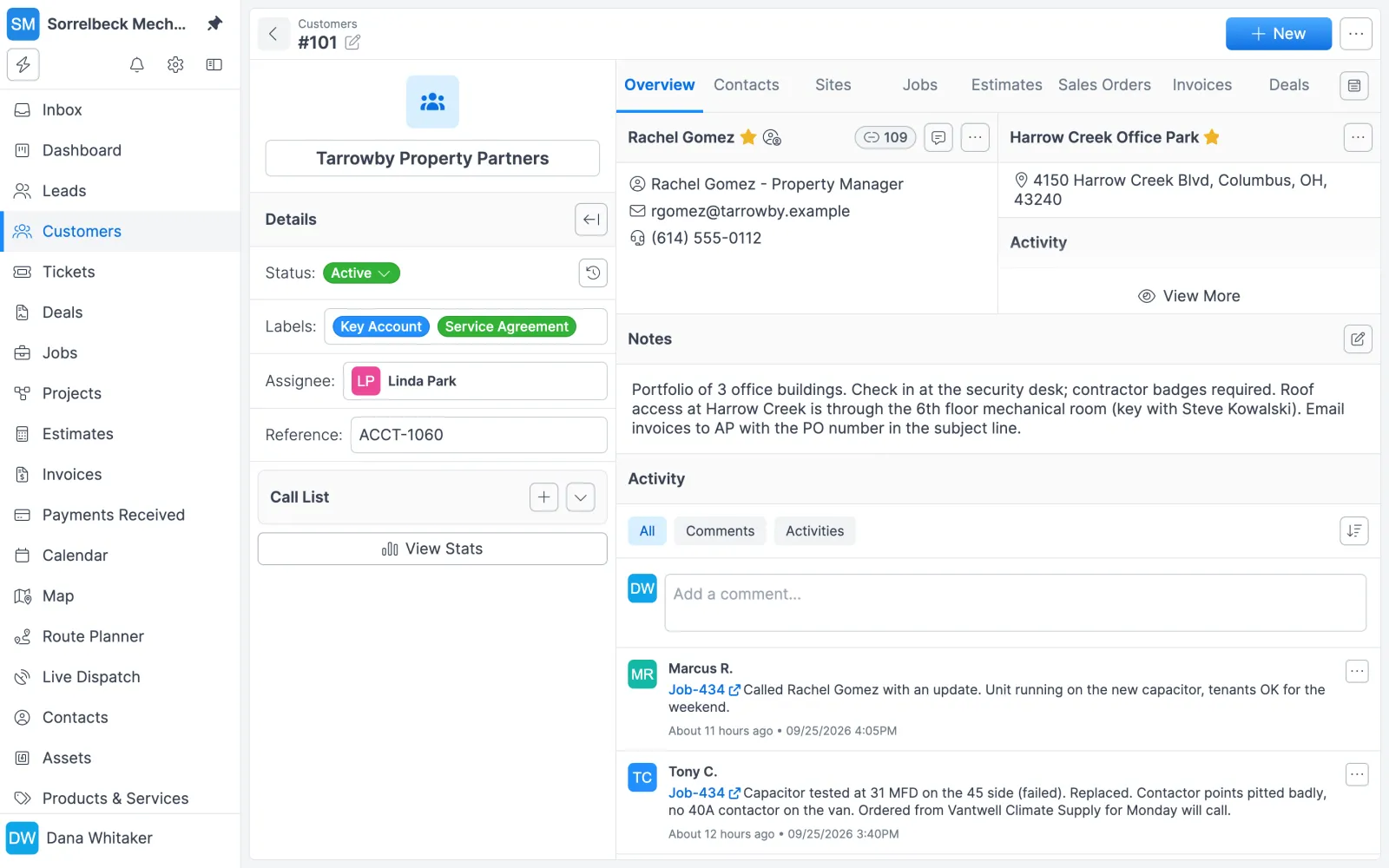
A customer record with contacts, sites, notes and the activity timeline.
Billing & payments
Invoice finished work, let customers pay online by card or ACH, and sync customers, items and invoices with QuickBooks Online.
- Invoicing & Payments Send invoices with your payment terms and tax rates applied, put maintenance contracts on recurring billing, and let customers pay by card or ACH from the portal or their invoice email, with invoices synced to QuickBooks Online.
- QuickBooks Integration Customers, items and invoices sync both ways between Forz and QuickBooks Online, while tax rates, accounts and payment methods come in from QuickBooks. The office bills in Forz, and your bookkeeper works in QuickBooks.
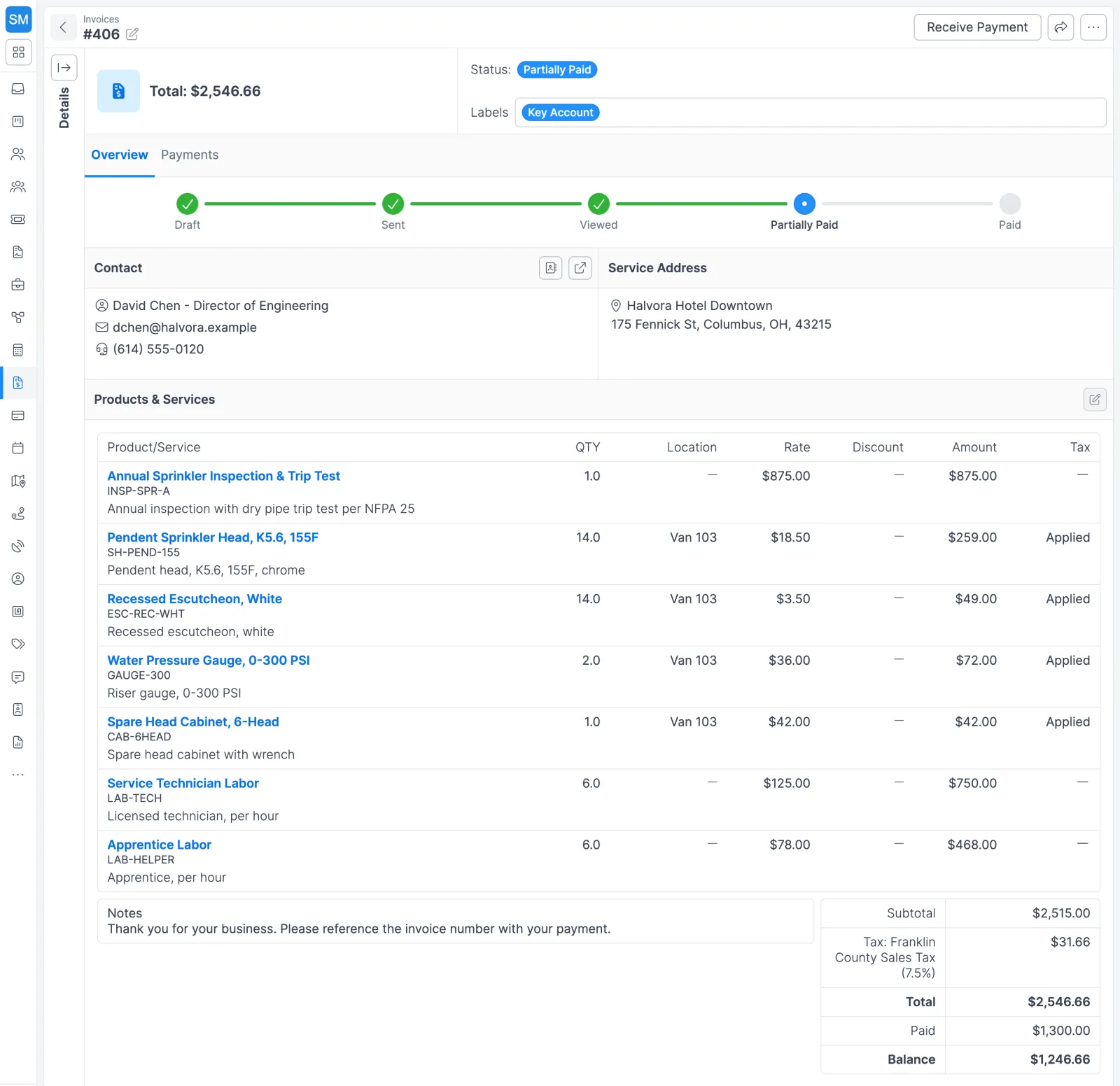
A partially paid invoice: the status tracker, line items and remaining balance in one view.
Inventory & purchasing
Track stock in every warehouse and service van, order from vendors, and receive against purchase orders so counts stay right.
- Inventory Management See stock on hand, committed, and available at every location. Nobody types a quantity: Forz recalculates it when a PO is received, a bill or invoice posts, a transfer completes, or someone logs an adjustment.
- Purchase Orders Email POs to vendors or send a PDF, receive partial shipments into the right warehouse or van, and generate bills from what came in with the PO pricing already on them. Record vendor payments and assign each expense to its project.
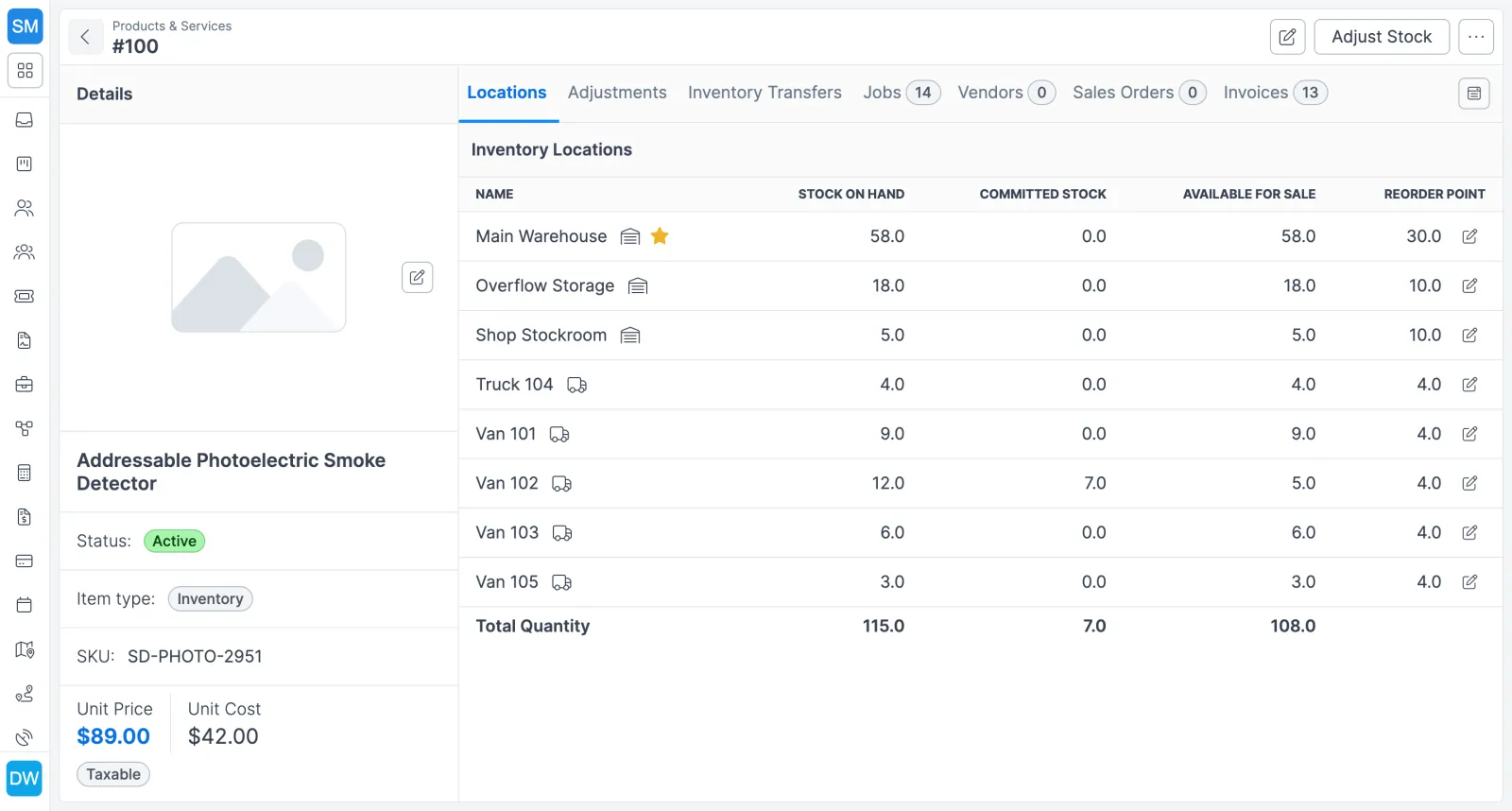
One item's stock by location: on hand, committed and available in the warehouse, stockroom and each van.
Inspections & compliance
Register every device, set the inspection interval each one needs (daily through every 7 years), and record Pass, Fail, or Bypass results customers can download.
- Inspections & Asset Tracking Barcode every elevator, generator, rooftop unit and backflow preventer, put each device type on its own inspection clock, and record results in the field. Your tools, vans and technician certificates live in the same system.
- Fire Inspection Software Fire Alarm, Sprinkler, Fire Suppression and Emergency Lighting come set up as system types. Barcode every device, match each inspection clock to your NFPA program, and post results to the customer portal.
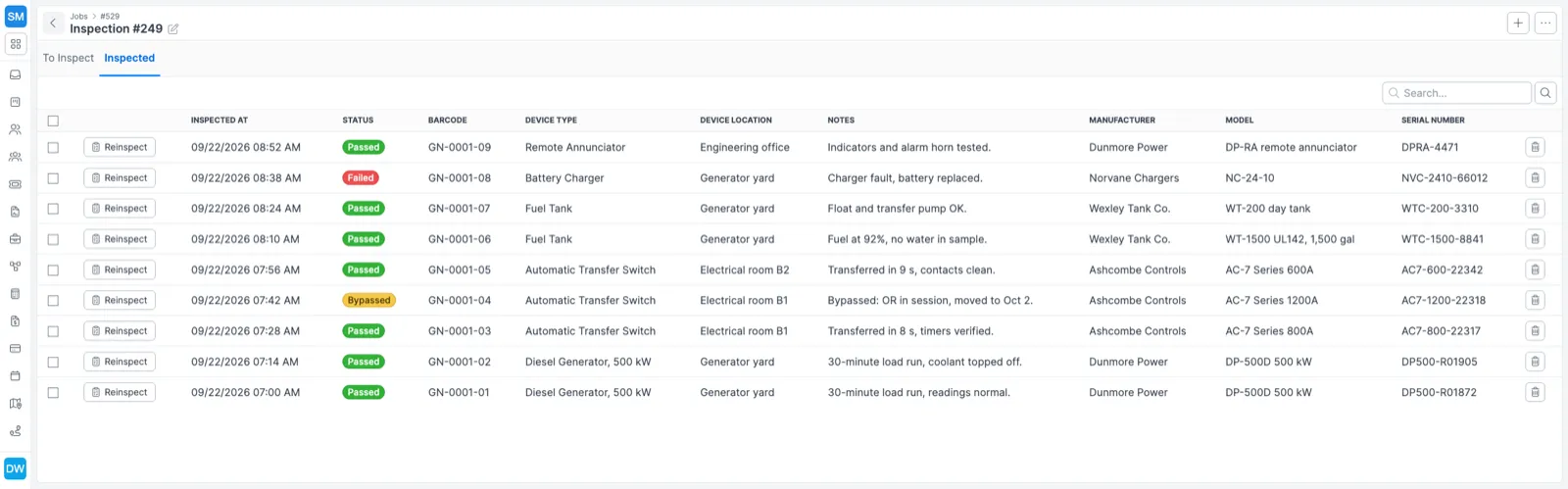
Inspection results per device, with barcode and serial number.
Reporting, automation & AI
See your numbers on dashboards, automate follow-ups with workflows, and use Forz's built-in AI or connect your own agent.
- Workflow Automation Build When-If-Then workflows for jobs, customers, leads, tasks, estimates, invoices and tickets. When a record is created or its status changes, Forz can email the tech or the customer, add a task, apply a label, set a field or post to your webhook.
- Reporting & Dashboards Describe the report you need in plain language and Forz builds the filter for you. Custom dashboards and saved views keep your job, invoice, and estimate numbers one glance away.
- AI Agents Use Forz integrated AI, or connect Claude, ChatGPT, Grok or your own agent with no Forz markup on your AI bill.
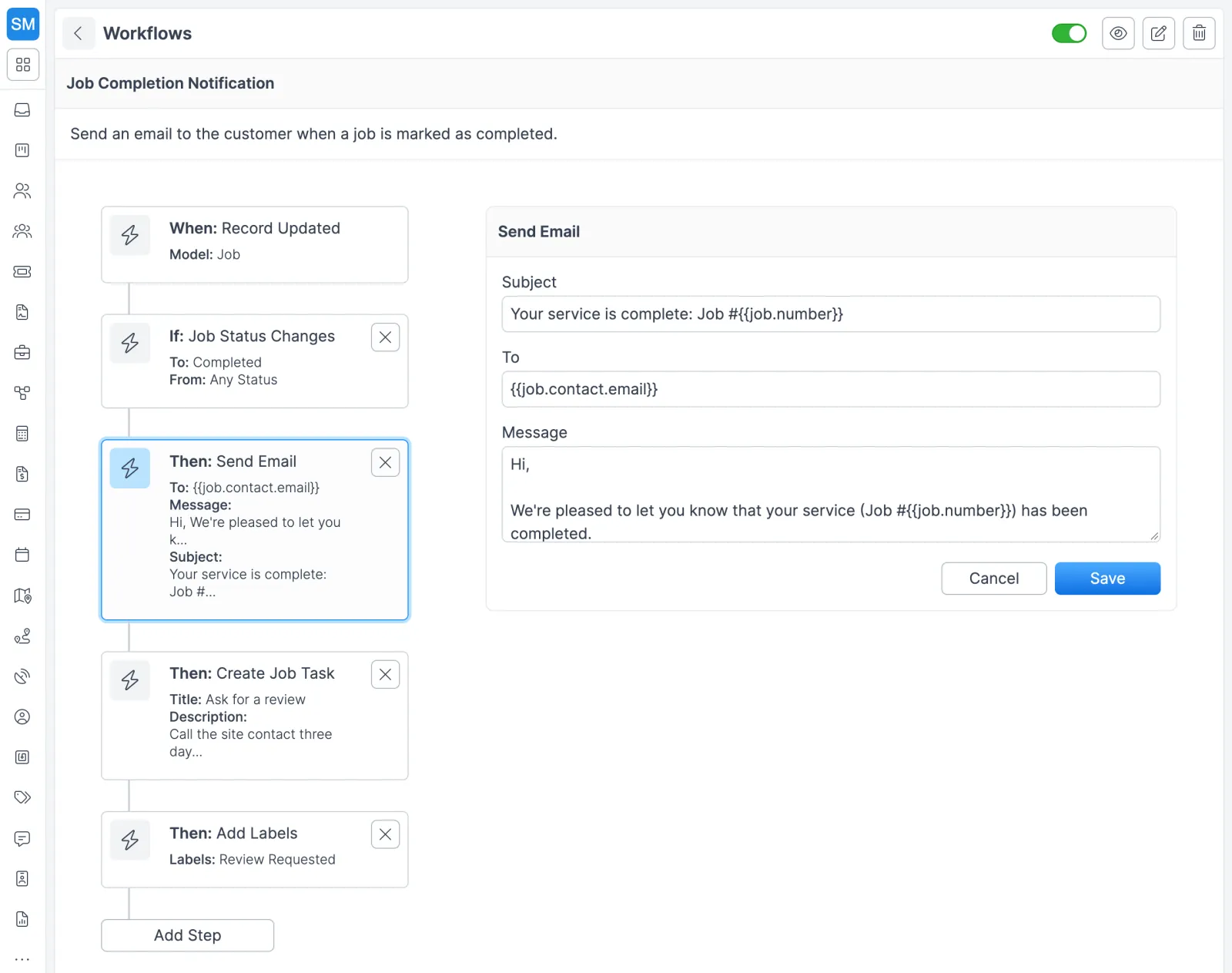
A workflow that emails the customer, adds a follow-up task and applies a label when a job is completed.
See it all in action
Get a personalized demo that shows how every feature works together.