
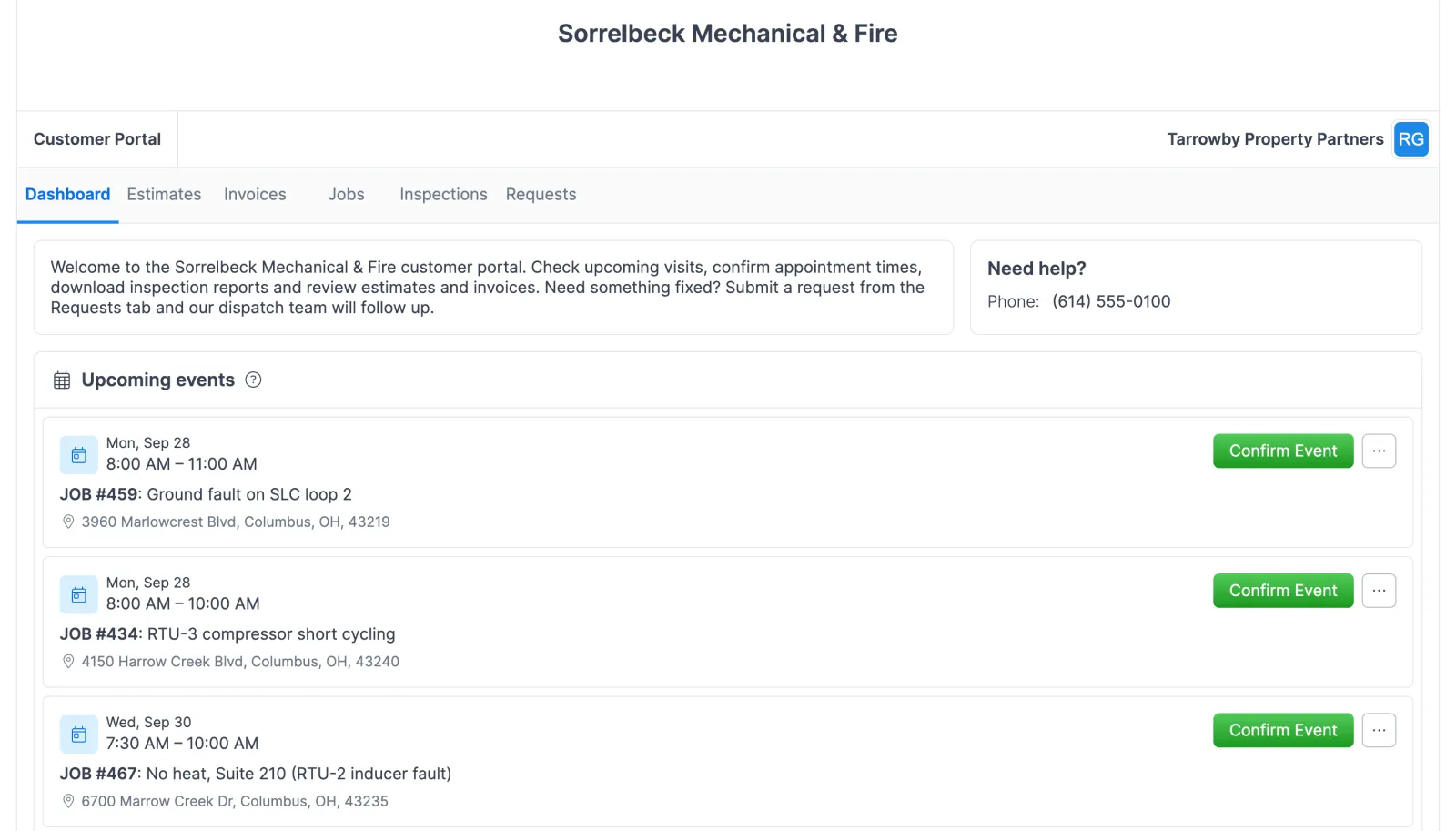
Set up the portal
- Check your portal address. Open Settings > Company and find your subdomain. Your portal is cp.forz.io/your-subdomain, and every customer uses that same address. The subdomain is set during onboarding, and Forz support can change it, which changes every shared link too.
- Link contacts to customers. Each customer needs at least one contact with a valid email address, linked to the customer record. A property manager who oversees several buildings can be linked to each customer and picks the account after signing in.
- Share the link. Put the address in your email footer and your estimate and invoice emails, add a Customer Portal link to your website, print it on invoices or business cards, or text it after a job. Settings > Customer Portal also gives you an embed code for your website.
- Choose what customers see. In Settings > Customer Portal, switch on the sections you want: Jobs, Invoices, Estimates and Inspections, plus Requests for a Requests tab. Turn on Appointments to list upcoming visits that customers can confirm. To let them pick an arrival window too, set up online booking.
Setup takes the Admin role.
What customers see, and when
Visibility follows each record’s status, so you decide when something appears.
| Record | What customers see | Hidden while |
|---|---|---|
| Jobs | Number, status, title, job type, system type, service address | The job is Unscheduled |
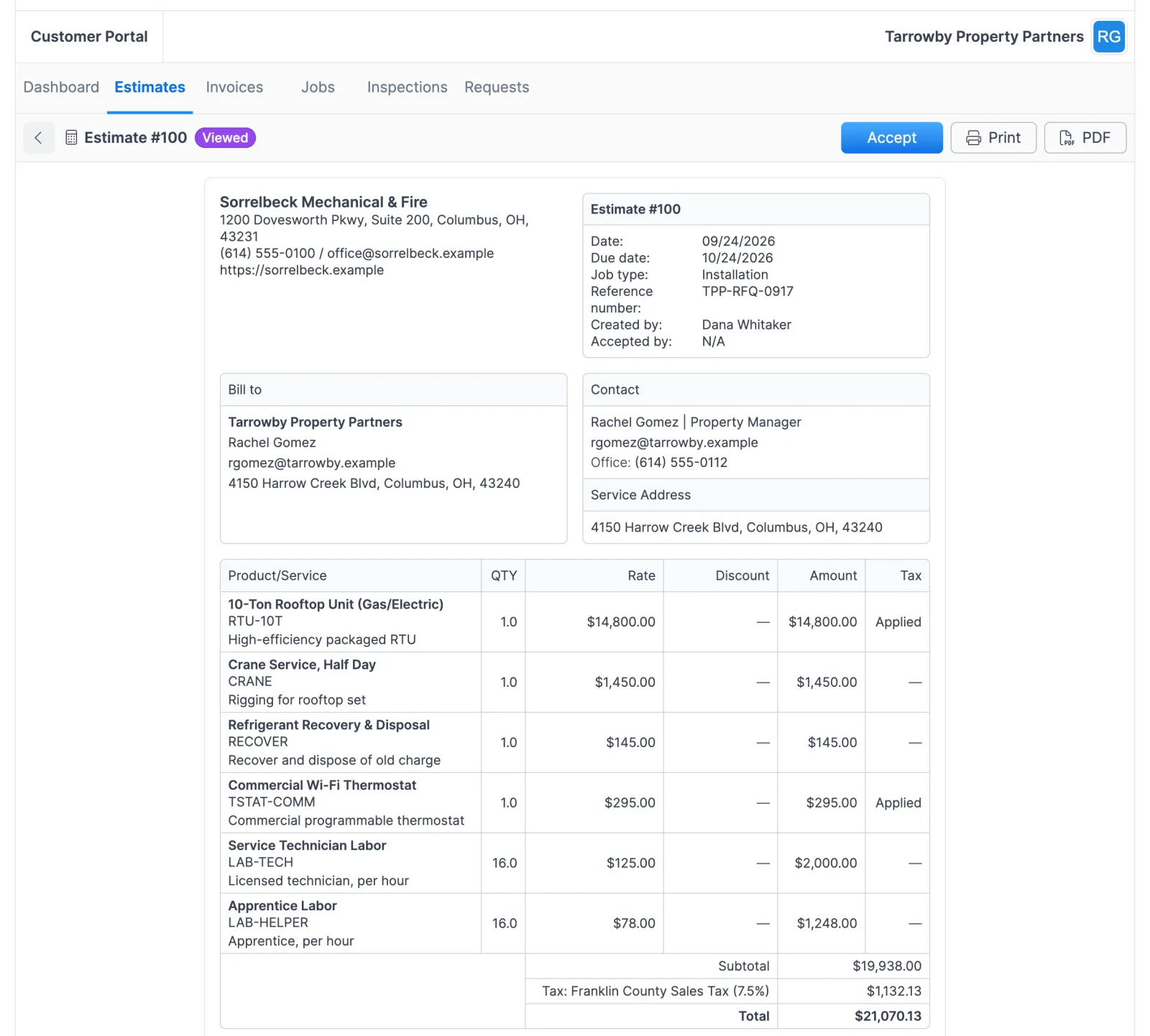
| Estimates | Number, status, amount, date, due date, line items, PDF | The estimate is a Draft |
| Invoices | Number, status, amount, balance, date, due date, line items, PDF | The invoice is a Draft |
| Inspections | Number, date, system type, pass/fail/bypass results, PDF | The parent job is Unscheduled |
Internal notes, assignee details and cost information on jobs never appear. Neither do tickets your team opens on the account, because the Requests tab lists only the requests the customer submitted.
The dashboard also shows the customer’s organization name and the signed-in contact’s name, email and phone number. Once you share the link, every estimate and invoice that isn’t a Draft and every job that isn’t Unscheduled is visible in the sections you’ve switched on, so check sensitive pricing before you send it.
What customers can do
Most of the portal is read-only. Customers can:
- accept an estimate, which sets it to Accepted, records the time and adds a note on the estimate
- download estimate, invoice and inspection PDFs
- confirm an upcoming visit with Confirm event, or add it to their own calendar, when Appointments is on (a confirmed visit shows a check mark on your calendar)
- pay an invoice with the Pay Invoice button, once Stripe is connected
- submit service requests and, with online booking on, reserve an arrival window
They can’t create or edit jobs, invoices or inspections, see another customer’s data or change their contact details. Each invoice email also carries a secure Stripe checkout link, so a customer can pay without signing in.
How commercial customers use it
A property manager with several buildings
A maintenance coordinator is a contact on three apartment complexes. After signing in, they see all three in a list, pick one to check a recent HVAC inspection, then log out and back in to review invoices for another building.
A building manager checking HVAC work
An HVAC contractor adds the building manager of an office tower as a contact and emails the portal link. The manager enters their email, types in the code and sees the building’s open jobs and inspection reports without calling the contractor’s office.
A restaurant owner approving an electrical estimate
An electrical contractor sends an estimate for a panel upgrade. The owner opens it in the portal, reviews the line items and total, and accepts. The contractor sees the status change to Accepted in Forz and moves on to scheduling the work.
Login and data security
- Codes are 6 characters, expire after 15 minutes, and a new code cancels the previous one.
- Resend Code waits 60 seconds between sends.
- Customers only see records that belong to their customer account, and Forz checks the contact’s link to that customer on every request.
- Removing that link ends access immediately. Sessions are stored on the server, and logging out clears them.
Works with the rest of Forz
- Estimates & Quotes: quotes your customers review and accept in the portal.
- Invoicing & Payments: the invoices customers see and pay here, plus the Stripe checkout link in each invoice email.
- Online Booking: how service requests become tickets, leads and booked visits, and how arrival windows work.
- Inspections & Asset Tracking: the pass, fail or bypass results by device behind every inspection PDF.
- Customer Communication: send the portal link by email or SMS after a job.
Setting it up? The Customer Portal Setup guide walks through each step.