
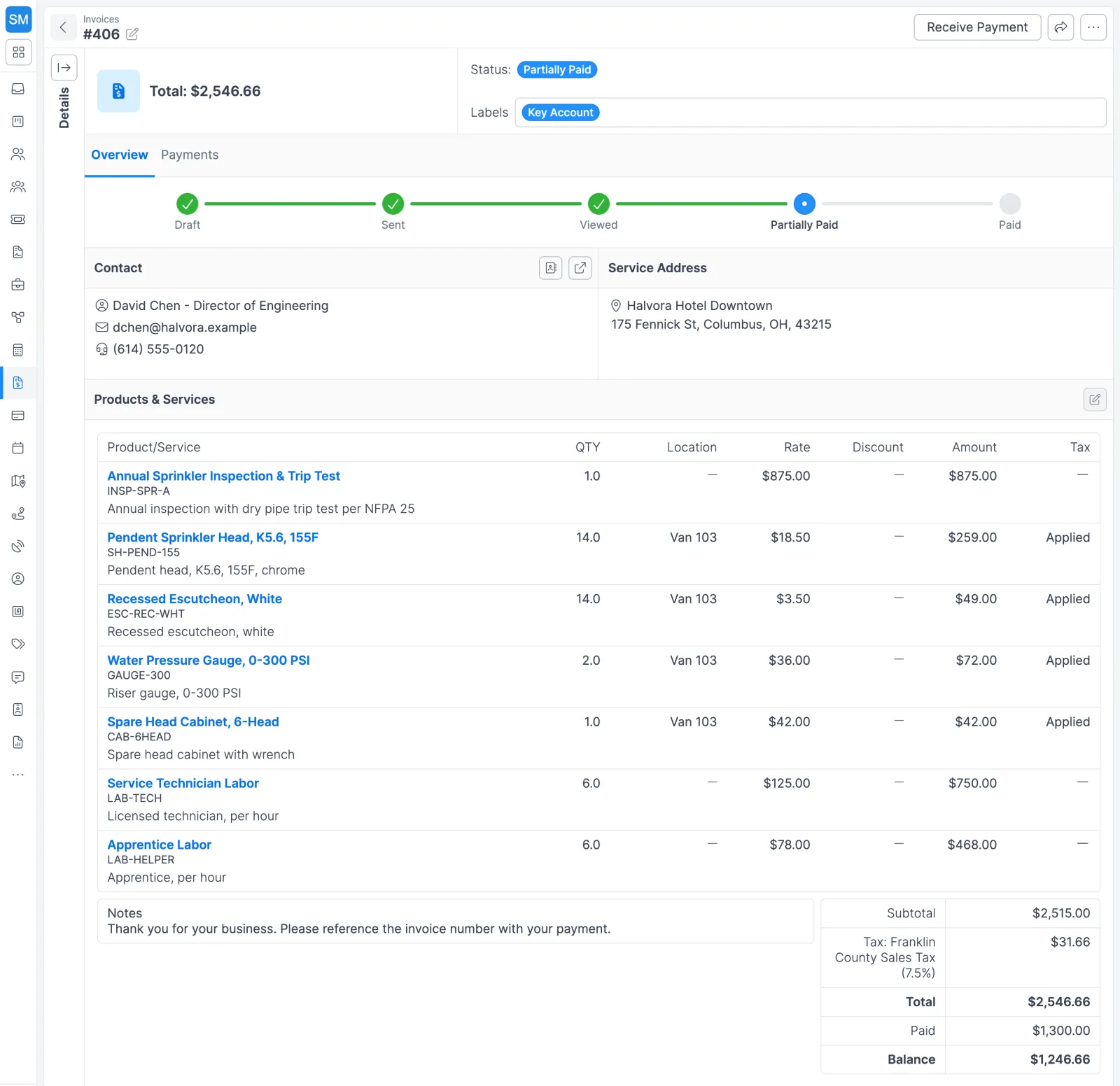
How invoicing works in Forz
- Set it up once. Add your tax rates, choose a default payment term (Net 30 unless you change it), and write the default customer notes that appear on every new invoice, such as payment instructions. Connect Stripe and QuickBooks Online under Settings > Integrations.
- Finish the job. Parts and labor go on the job as line items from your shared items catalog, the same catalog your estimates and purchase orders use.
- Generate the invoice. Click Convert > Invoice on the job. Forz creates a Draft with the job’s customer, contact, service address, payment term, and line items, and links the two records. Each job carries one invoice, and once that invoice is sent the job page shows what was invoiced, what was paid, and what is still outstanding.
- Review and send. Check the totals, add a customer note, and choose Send by email. The email comes from your invoice email template and carries the link to view and pay. If you hand the invoice over in person or by mail, click Mark as Sent instead.
- Get paid. The customer pays online through Stripe from the portal or the emailed link, or your office records a check, cash, or wire with its reference number. Each payment gets its own number, updates the invoice balance and status, and syncs to QuickBooks Online.
- Follow up. Forz checks due dates every day and flags open invoices as Overdue. A second email template (a payment reminder, for example) can be picked when you resend.
What each invoice status means
| Status | When Forz sets it |
|---|---|
| Draft | The invoice is saved but hasn’t gone to the customer |
| Sent | It was emailed, or marked as sent for mail or hand delivery |
| Viewed | The customer opened the invoice link |
| Partially Paid | A payment was recorded and a balance remains |
| Paid | The balance is zero |
| Overdue | The due date passed on a Sent, Viewed, or Partially Paid invoice |
| Void | The invoice was canceled and can no longer be edited or paid |
Extend a due date past today and an Overdue invoice goes back to Viewed or Sent on its own.
Terms and tax rates that keep their history
When you change a tax rate or a payment term, Forz archives the old version and creates a new one. If your state raises sales tax from 6.5% to 7.0%, invoices issued before the change still show 6.5% and new ones use 7.0%. Payment terms work the same way, so an outstanding Net 30 invoice keeps Net 30 even after you switch your standard terms.
Date-driven terms suit property managers who pay on a fixed day. Create a “Due 1st of Month” term, set Next month if issued within (Days), and an invoice created too close to the 1st rolls to the following month instead of coming due days after it arrives. If QuickBooks groups a state and local rate into one tax code (6.0% plus 1.25%), Forz imports it as a single 7.25% rate.
Common billing setups
HVAC maintenance contract
A property management firm pays $450 a month for preventive maintenance on three rooftop units. Your dispatcher creates one recurring invoice with a monthly frequency and three $150 line items. Forz drafts each month’s invoice ahead of the billing date, ready for a quick review. Recurring jobs handle the visits themselves (see service agreements).
Fire protection: one wire, three invoices
A customer sends a single $4,200 wire covering invoices of $1,500, $1,800, and $900. Your office records it once from Payments Received, splits the amount across the three invoices, and all three move to Paid.
Electrical: half now, half later
A customer opens a $5,000 invoice and pays $2,500 through the Stripe checkout. Forz records the payment, and the invoice shows Partially Paid with $2,500 remaining until the second payment comes in.
Works with the rest of Forz
- Quotes: an accepted estimate converts to a job with its line items, and that job becomes the invoice.
- Accounting: the QuickBooks Online integration page goes deeper on what syncs and in which direction.
- Customer self-service: in the customer portal, customers see every outstanding invoice and their total balance, and pay any of them with the Pay Invoice button.
- Large jobs: a project collects the invoices from all its jobs, with billed, paid, and outstanding totals in one place.
- Collections: a custom report such as “all overdue invoices over $500” exports to CSV for whoever makes the calls.
Invoicing is included in every plan: $50/user/month billed annually, $60 month-to-month, 10-user minimum. See pricing for details.
Setting it up? The Invoices guide and the Customer Checkout guide walk through each screen.