
How an inspection program runs in Forz
The same structure works whether you service elevators, generators, rooftop units or backflow preventers. You describe your equipment once, and the device records carry the schedule from then on.
- Set up the system type. In Settings > Systems, add a type for the equipment you service and give it device categories and device types. Each device type gets one or more inspection types, each with a name and a frequency.
- Add the system at the customer’s site. A system is one installation at one location, such as Building A Generator. You create it from the site or from a job.
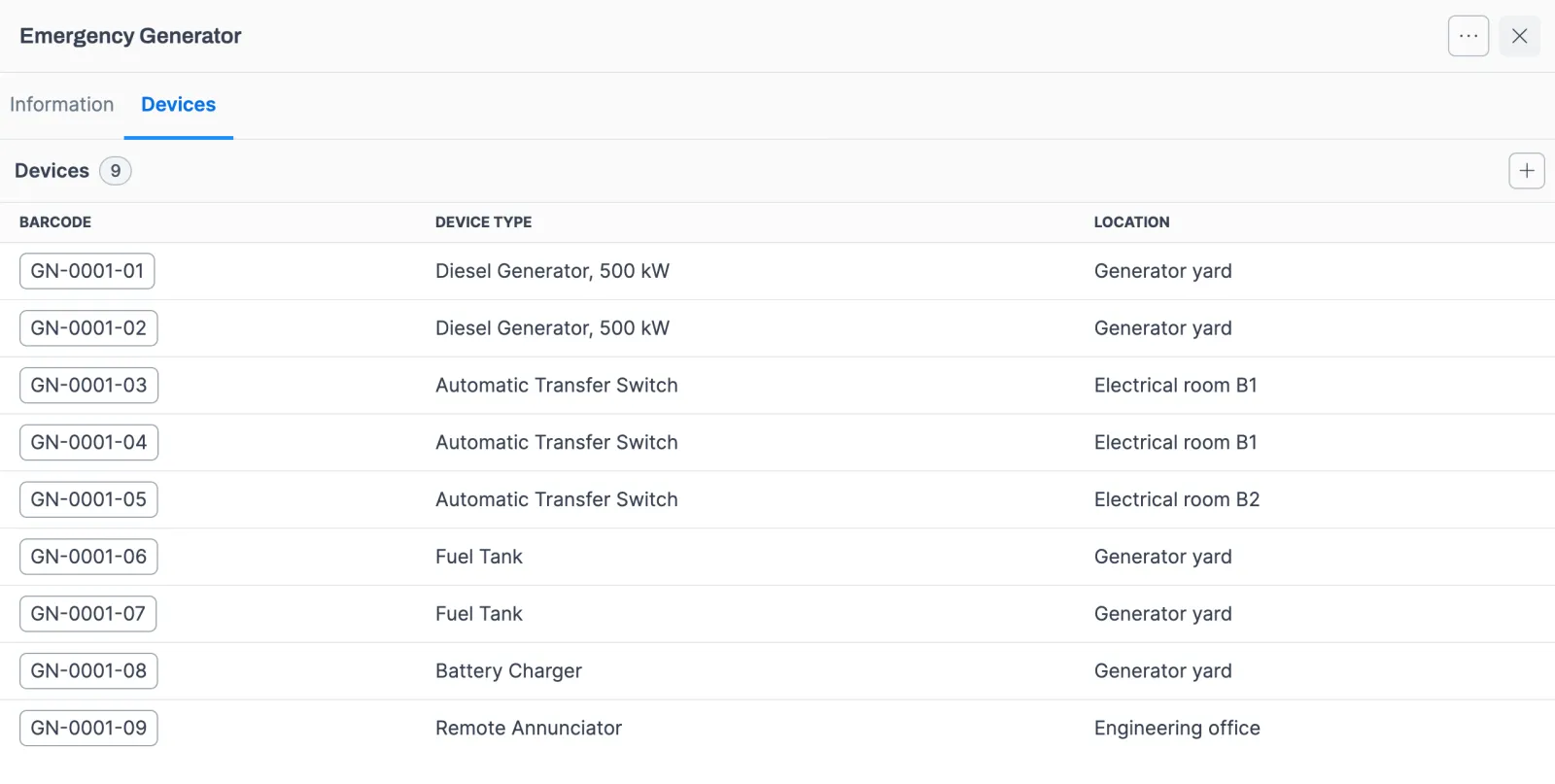
- Register the devices. Scan or type each barcode, pick the device type and describe where the device is installed. Forz sets the first due date for every inspection type when you save.
- Send the inspection job. A job with the Inspection job type and a system selected gets its inspection record created automatically. You schedule and dispatch it like any other job.
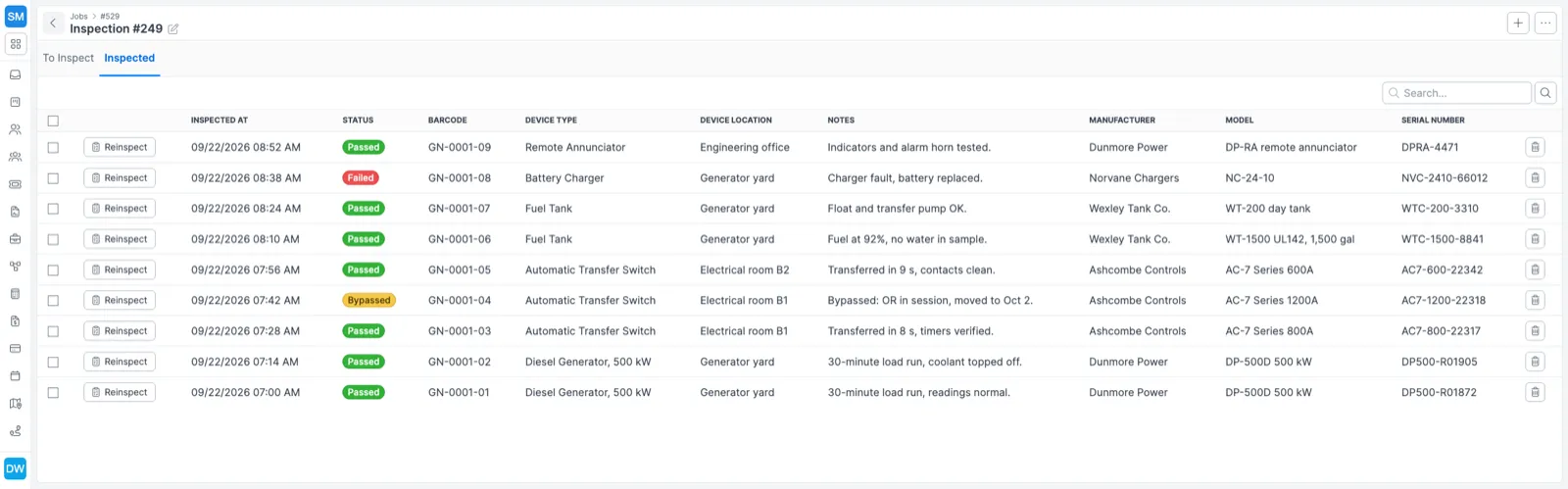
- Record results on site. The technician opens each device in the mobile app, marks Pass, Fail or Bypass, adds a photo and saves. That inspection type’s due date moves forward by its frequency.
- Share the proof. The customer portal lists the inspections on the customer’s jobs, with each device’s result and a PDF report to download.
How due dates are counted
Each frequency is a fixed number of days, counted from the day the device is created or the day an inspection is saved.
| Frequency | Interval |
|---|---|
| Daily | 1 day |
| Weekly | 7 days |
| Biweekly | 14 days |
| Monthly | 30 days |
| Quarterly | 90 days |
| Semi-annual | 180 days |
| Annual | 365 days |
| Every 2 years | 730 days |
| Every 3 years | 1,095 days |
| Every 4 years | 1,460 days |
| Every 5 years | 1,825 days |
| Every 6 years | 2,190 days |
| Every 7 years | 2,555 days |
The clock restarts on the day the result is saved. A monthly check done on the 10th is next due 30 days after the 10th, whatever the original date was. When a contract promises visits on fixed calendar dates, schedule those visits with recurring jobs (see service agreements) and let the device clocks track what each visit has to cover.
Examples by trade
Elevator maintenance
Create an Elevator system type, add a device type for each kind of unit you maintain, and give it the inspection types your maintenance control program calls for. The elevator maintenance checklist lists machine room, hoistway, pit, door and safety items you can turn into checkbox fields on the device inspection. More on the trade: elevator services.
Standby generators
Register each generator as a device and give its type separate weekly, monthly and annual inspection types, so one unit carries three independent due dates.
HVAC rooftop units
If you install the same rooftop unit configuration often, set it up once, mark it as a template named Standard RTU Configuration, and add it to each new HVAC system. Custom fields on the system type can hold details such as refrigerant type.
Backflow preventers
For annual backflow testing, the technician runs the test, records Pass if the assembly holds within tolerance or Fail if it needs repair, and attaches a photo of the gauge readings. The next due date lands 365 days out. Tag your certified testers with a Backflow Certified skill so only they are proposed for the work.
Your own equipment and people
The asset registry covers what your company owns. Each asset gets a number, a unique name, a type, manufacturer, model and serial number, plus a photo. Status follows the assignment: Unassigned, Request sent or Assigned. Search by serial number, or filter by assignee to see everything one technician holds.
An electrical contractor, for example, logs every multimeter and thermal imager with its serial number. When an apprentice starts, the foreman assigns a meter, the apprentice accepts it on their phone, and the chain of custody is on record. If another technician held the asset before, Forz notifies them that it was reassigned.
Certificates sit on the technician’s profile under Team. An HVAC office manager uploads each technician’s EPA Section 608 card as a PDF, and the dispatcher checks it before assigning a maintenance contract that requires certified technicians.
Works with the rest of Forz
- Fire inspection software covers the fire alarm, sprinkler, suppression and emergency lighting defaults.
- Service agreements generate the recurring visits and invoices behind each inspection program.
- The mobile app handles results, photos and asset handoffs offline.
- Scheduling and dispatch matches skills to jobs.
- Workflow automation can create a follow-up task when an inspection job moves to Completed.
Setting it up? The Managing Devices and Inspections guides walk through each screen.