
Two-way texting and email for contractors, with call summaries on every contact

Text and email customers from threaded conversations your whole office can see, review recorded calls with a transcript and a 2–3 sentence AI summary, and send estimates and invoices with templates that fill in the details.

2–3 sentence AI summary per recorded call Included in every plan iOS & Android
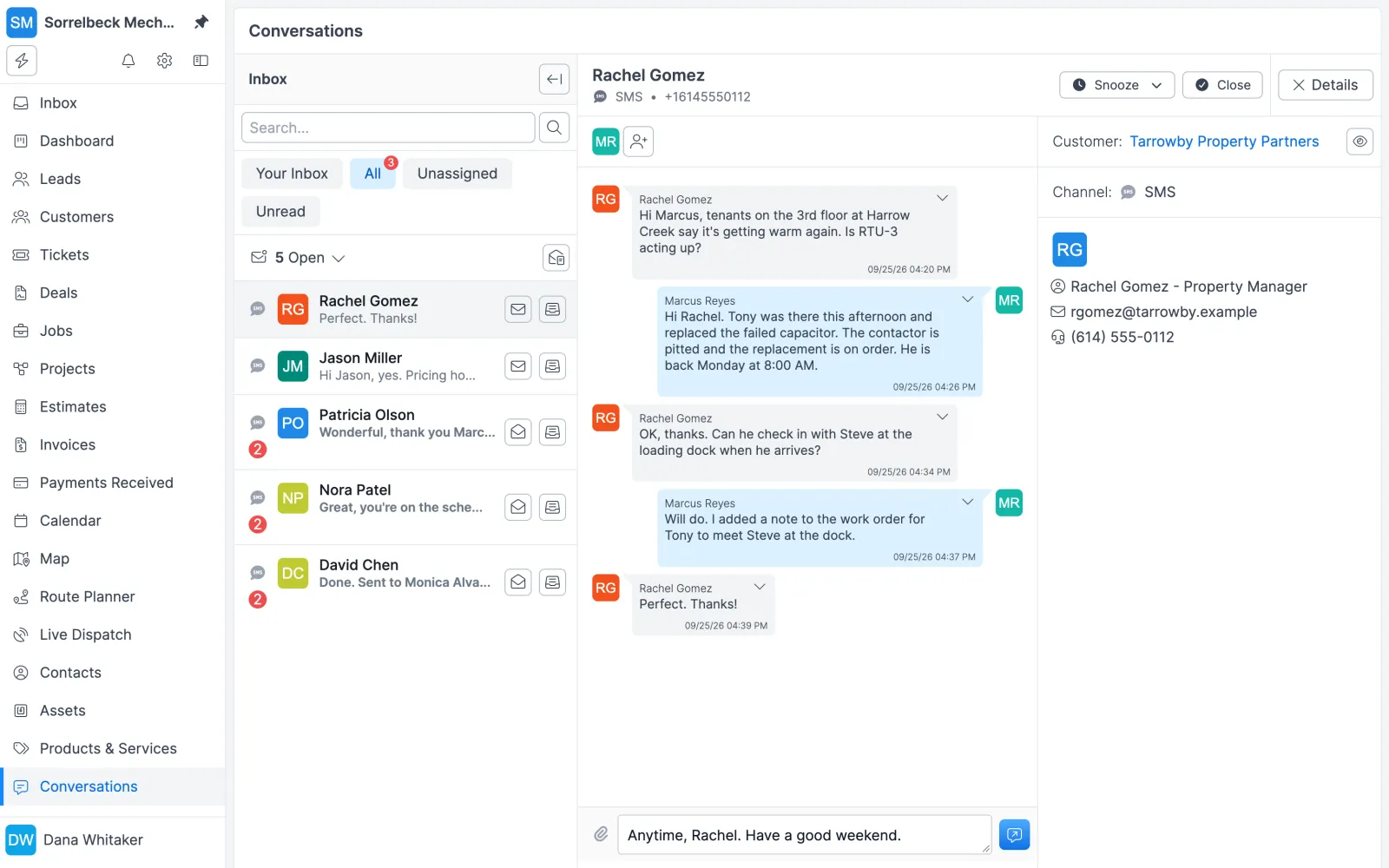
Forz Conversations inbox showing a two-way SMS thread about a warm rooftop HVAC unit, with the contact's details on the right
Two-way SMS threads with the customer's details alongside.

The problem with the old way

Customer texts on personal phones

A customer texts a tech's cell to move an appointment. The office never sees it, and when that tech is off, the conversation goes with them.

Calls nobody wrote down

The property manager called about a leak that came back. Unless someone took good notes, the details are in one dispatcher's memory and nowhere else.

The same email, typed again

Every estimate and invoice email gets written from scratch, with a different subject line each time and a record number that's sometimes missing.

How customer communication works in Forz

Two-way SMS conversations

Text a contact from Forz and see their replies in the same thread. Texts run on your own Twilio account or on Forz telephony (priced separately), and inbound replies show as unread for everyone assigned to the conversation.

Email threads in the same inbox

Start a conversation by email instead of SMS. If a contact has only a mobile number or only an email address, Forz picks the channel for you, and messages can carry file attachments.

A shared inbox with Open, Closed and Snoozed

Filter by Your Inbox, All or Unassigned, with unread counts on each, and switch on Unread to see only unread threads. Snooze a thread for 1 hour or 4 hours, or until 9:00 AM tomorrow or next week, and it returns to Open on its own.

Call log with recordings

Inbound and outbound calls through your Twilio account or Forz telephony are logged with direction, numbers, status, duration and the recording. Forz matches the caller's number, or the number you dialed, to your contacts.

Transcripts and AI call summaries

Completed calls with a recording are transcribed automatically, and AI writes a 2–3 sentence summary. The summary is saved as a Call Summary note on the matched contact, so dispatchers can read what was said without replaying the call.

Email from any estimate, invoice or job

Click Send by email on an estimate, invoice, job, purchase order or sales order. Forz fills in the recipient and template, includes a link to the record's portal page, logs a note on the record, and moves a draft estimate or invoice to Sent.

Email templates with merge variables

Default templates for estimates, invoices, jobs, purchase orders and sales orders fill in the record number, amount and your company name. Edit the wording, add your own templates, and send from a verified address such as billing@yourcompany.com.

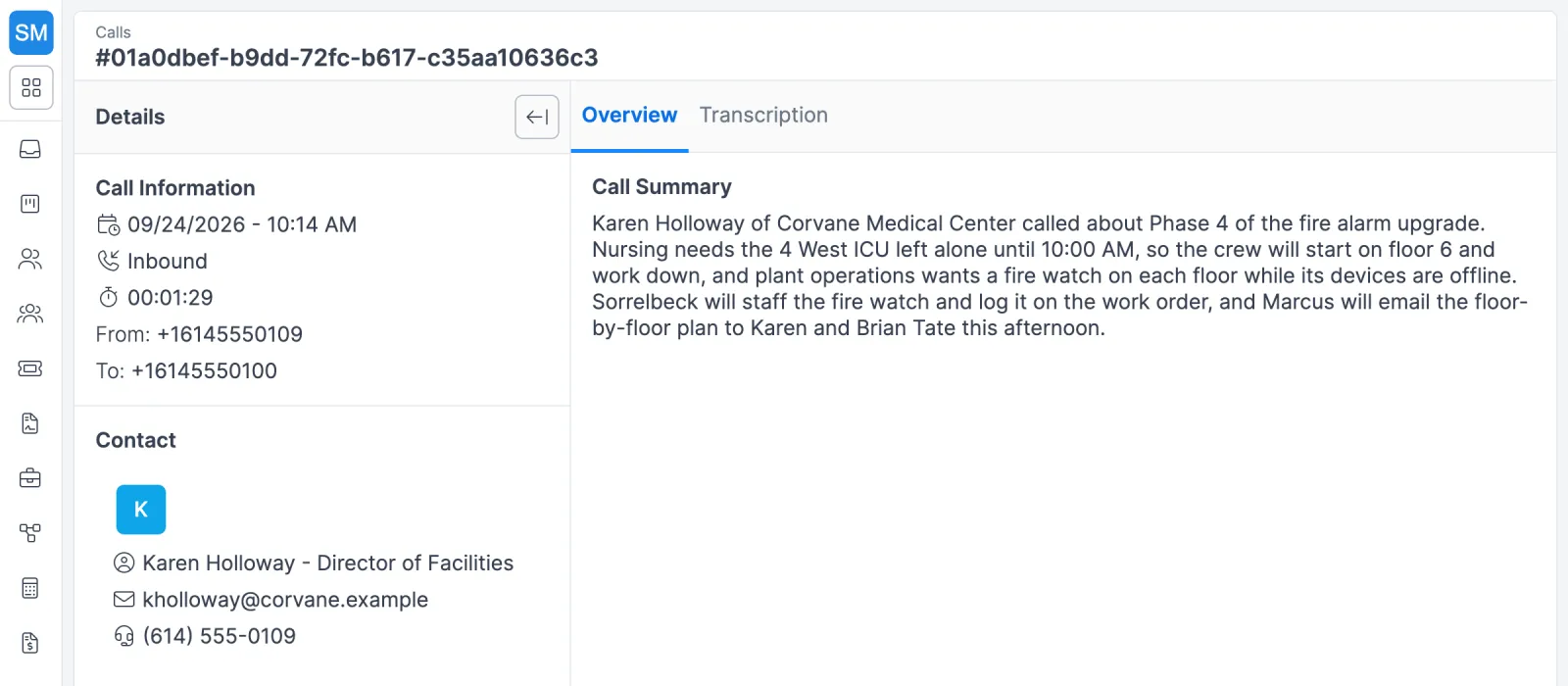
Forz call detail showing an inbound call's time, duration and numbers, the matched contact card, and a 3-sentence AI call summary
Each recorded call gets a short AI summary on its Overview tab.
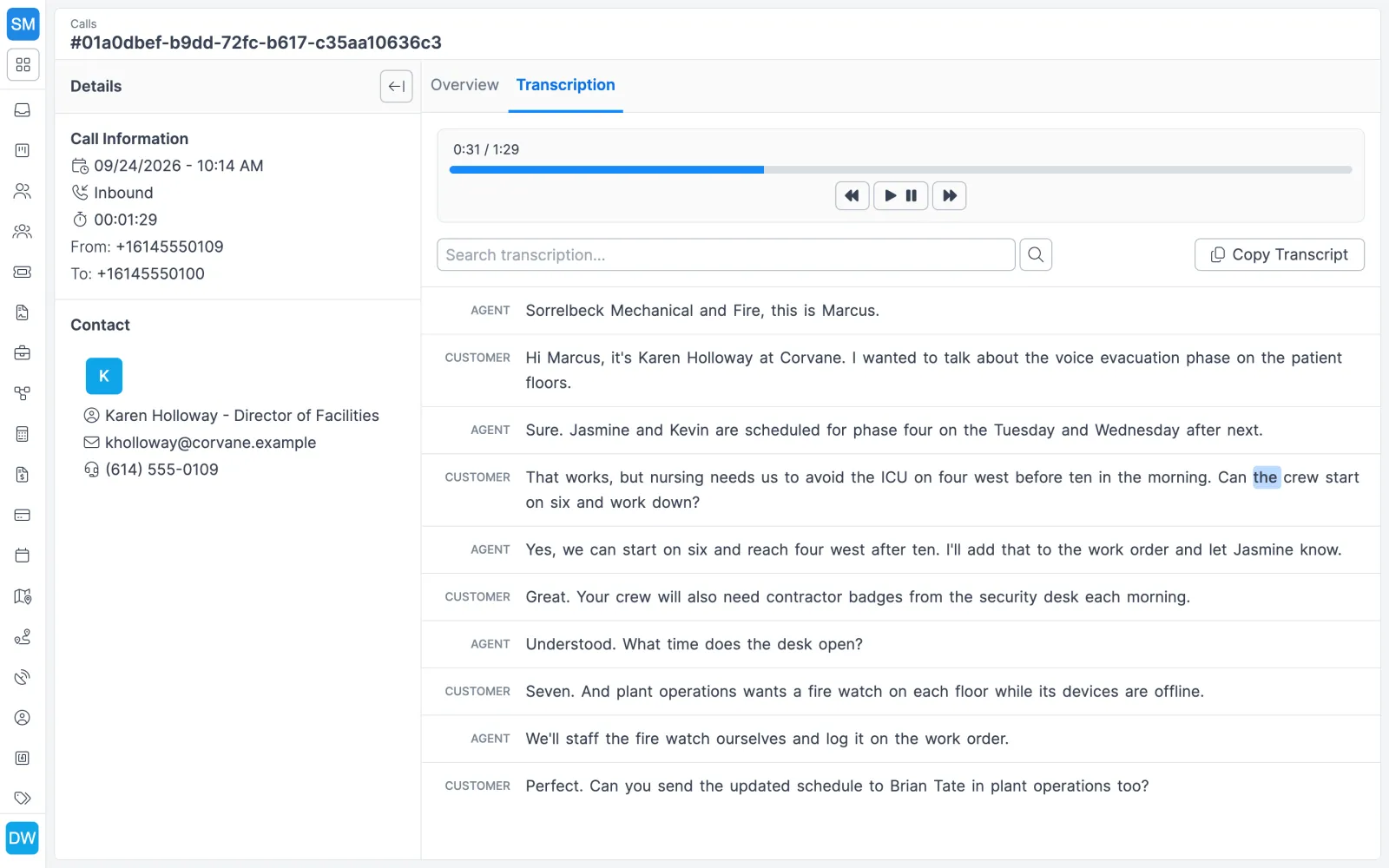
Forz call detail with a playable recording and a speaker-labeled transcript of a customer call about hospital fire alarm work
The transcript, with each speaker labeled, next to the recording.

Setting it up

  1. Pick your phone service. Use Forz telephony, priced separately, or connect your own Twilio account: an admin enters your Twilio Account SID, Auth Token and phone number (in E.164 format, such as +15551234567) in Settings > Integrations, and Forz checks the credentials and shows Connected.
  2. Turn on Calls. Calls is a module you switch on in Settings > Modules. Calls that are recorded are transcribed and summarized automatically.
  3. Verify an email sender. Add a sending address and verify it (email confirmation, DKIM and return path). Give each sender a purpose: General, Billing (invoices, estimates, jobs and purchase orders), Support (replies from the conversations inbox) or Notifications (workflows, alerts and portal emails).
  4. Keep phone numbers clean. Store each contact’s numbers with a label and the country code. Forz normalizes them to digits and matches incoming calls and texts to the right contact.
  5. Edit your templates. Adjust the default estimate, invoice, job, purchase order and sales order emails in Settings > Email notifications > Email Templates, then send a test to yourself from a draft record.

What happens after a recorded call

StepWhat Forz does
The call completes with a recordingQueues a transcription about 5 seconds later
The transcript is readyAI writes a 2–3 sentence summary
Contact matchChecks the caller’s number (inbound) or the number dialed (outbound) against your contacts
FilingSaves the summary as a Call Summary note on that contact, visible on its activity timeline

Missed calls and calls with recording turned off get no transcript. Forz does not answer the phone for you: your team takes every call, and Forz keeps the record.

Four days in the office

HVAC: checking on a repair

The day after an AC repair, a dispatcher texts Maria from Conversations: “Just checking in, is your AC working properly after yesterday’s repair?” Maria’s reply lands in the same thread. The dispatcher either closes the conversation or opens a follow-up work order.

Plumbing: a callback about a leak

A property manager calls to say yesterday’s leak isn’t fixed. The dispatcher opens the call in today’s log and reads the summary on the call’s Overview tab: a continued leak under the kitchen sink, a return visit requested this week, water damage to a cabinet. The follow-up work order starts with those details already written down.

Fire protection: confirming an inspection by email

Two days before a scheduled fire safety inspection, the dispatcher emails the building manager from Conversations with the date, time and technician name, then snoozes the thread until tomorrow morning, the day before the visit, to check for a reply.

HVAC in peak season: triaging the inbox

When dozens of texts arrive each day, the lead dispatcher works the Unassigned filter, replies or adds a teammate to each thread, and closes finished ones so the Open view shows only live conversations.

Works with the rest of Forz

  • Field service CRM: every conversation and call appears on the contact’s activity timeline, and call lists organize outbound follow-up.
  • Estimates and the customer portal: emailing a record includes a link to its portal page, where customers accept an estimate or pay an invoice.
  • Online booking: customers who book an arrival window get a confirmation email showing that window.
  • Workflow automation: the Send Email action runs on When-If-Then rules, for example emailing the technician when a job moves to Scheduled.
  • AI agents: call summaries are built in, and you can also connect your own agent through the Forz CLI or REST API.
  • Integrations: Twilio for SMS and voice, plus QuickBooks Online and Stripe.

Setting it up? The Conversations guide, the Calls guide and the Twilio Integration guide walk through each screen.

Frequently asked questions

Yes. Conversations let your office send and receive SMS in threads tied to each contact, next to email threads in the same inbox. Inbound texts show as unread for everyone assigned to the conversation, so a reply doesn't sit in one person's phone. Threads can be assigned, closed, or snoozed until a set time.

No. SMS and voice calls can run on your own Twilio account or on Forz telephony, which is priced separately. To use Twilio, an admin enters the Twilio Account SID, Auth Token and phone number in Settings > Integrations, and Twilio bills its usage to your Twilio account. Email conversations need neither.

Yes, for recorded calls, whether they run on your own Twilio account or on Forz telephony. When a recorded call completes, Forz transcribes it, writes a 2–3 sentence AI summary, and saves that summary as a Call Summary note on the contact whose number matches. Missed calls and calls without a recording get no transcript.

No. Forz does not answer calls or talk to callers. A person on your team takes the call, and Forz transcribes and summarizes the recording afterward so the details land on the contact record. Transcripts and AI call summaries are built into Forz.

Conversations support SMS and email. Each thread is tied to one contact and one channel, and if an open conversation already exists for the same phone number or email address, Forz offers to continue it instead of starting a duplicate. Workflows can also send an email automatically, for example when a job, lead or customer is created or changes.

Yes. Forz creates default email templates for estimates, invoices, jobs, purchase orders and sales orders. Admins can edit the subject and body, insert variables such as the invoice number, amount and company name, and add templates of their own, such as a payment reminder. The default templates can be edited but not deleted.

See customer communication in action

Get a 30-minute personalized demo and watch how it works on your own workflows.

Free standard data import Free 30-minute demo, no commitment