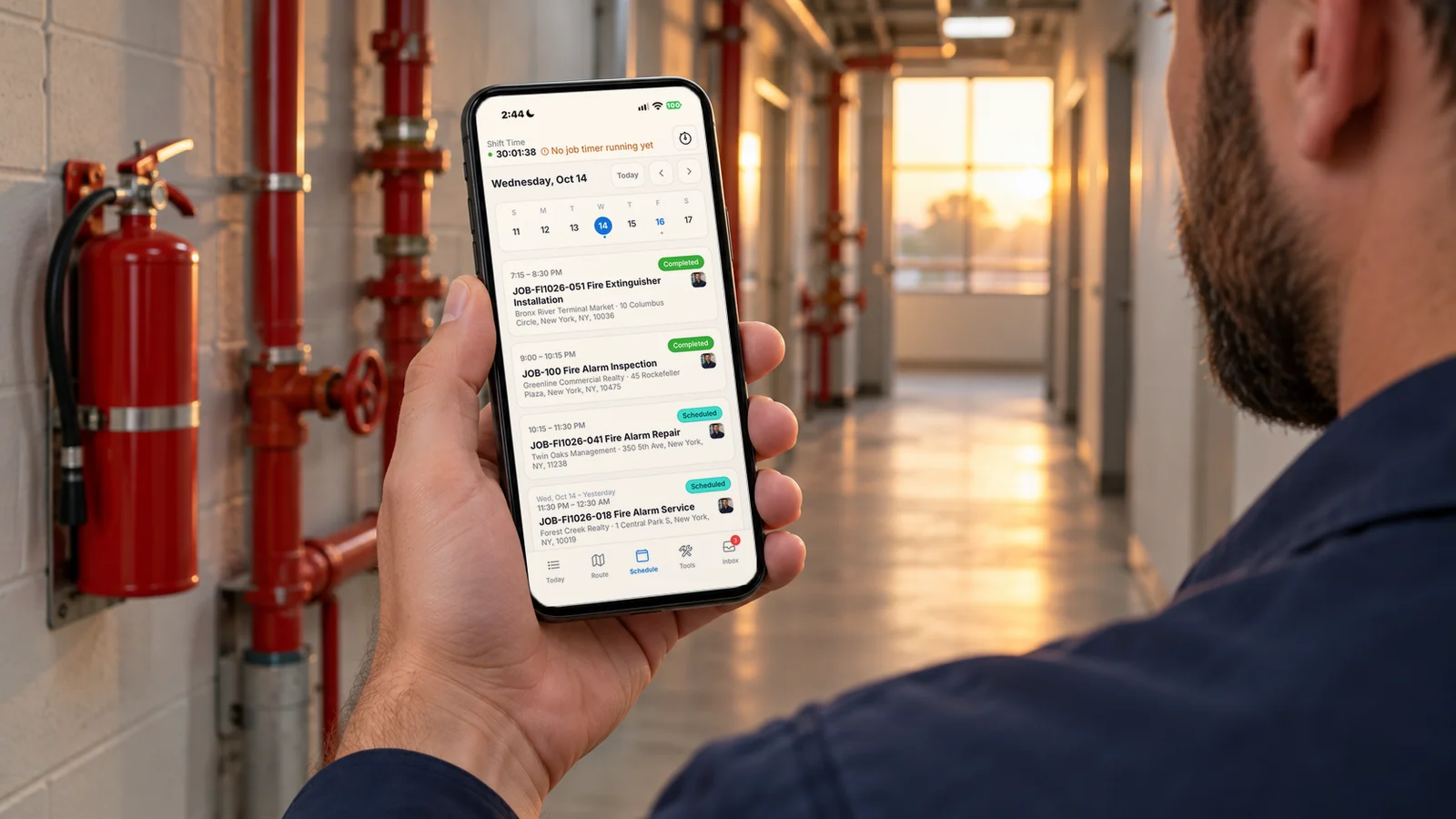
A field service mobile app that works where your techs do, even offline.

iOS and Android apps with offline access and auto-sync put photo capture, digital signatures, and on-site inspection results in every technician's pocket, with or without a signal.

iOS + Android with offline access Included in every plan iOS & Android

The problem with the old way

Paperwork riding shotgun

Work orders live on clipboards, photos on personal phones, and signatures on carbon copies. Then someone at the office re-keys it all, and the details that never made it back are gone.

Apps that quit in dead zones

Commercial trade work happens in basements, riser rooms, machine rooms, and parking garages, exactly where cell coverage doesn't. An app that needs a signal sends techs back to paper the moment they lose coverage.

Techs calling the office for answers

Every 'what's the unit history?' or 'who's the site contact?' call stops a technician and a dispatcher at the same time. Job context should travel with the job.

How mobile app works in Forz

iOS and Android apps

Technicians install Forz Mobile from the App Store or Google Play and sign in with their Forz account. The app is included with every plan at no additional cost, and office staff keep working in the Forz web app.

Offline access with auto-sync

Work keeps moving without a signal. Technicians keep working in basements, mechanical rooms, and parking structures, and their changes sync automatically once the device is back online.

The whole job on the phone

Assigned jobs open with the customer, site, notes, and history, so the site contact and past work are there before the technician walks in. Assign or hand off a job in the web app and it shows up in that technician's schedule.

Alerts for new jobs and schedule changes

With notifications allowed, technicians get an alert when a new job arrives or their schedule changes, and when the office sends them equipment, a tool, or a vehicle to accept.

Photos and signatures on site

Attach photos of job conditions, equipment, and finished work, and capture the customer's signature on the phone. There are no paper forms to collect, scan, or chase down at the end of the week.

Load the truck from the phone

Open Truck Load in the app, check each part off by tap or by scanning a barcode, SKU, or bin code with the camera, and Confirm Load before leaving the yard. Short lines show by name and bin. Loading does not change inventory levels.

Inspection results in the field

Record each inspection result as Pass, Fail, or Bypass, with optional photos attached. Inspection records sync to the app, so the technician works from the same record the office sees.

Clock in and out with GPS

Technicians clock in and out from the app, with GPS coordinates captured at each clock event. A weak GPS fix is flagged but never blocks the clock-in, and lunch deductions apply automatically based on your settings.

Asset handoffs from the app

When the office assigns equipment, tools, or a vehicle, the technician accepts or declines the request in the app, and the activity log records the handoff for accountability.

A technician’s day in the app

  1. Sign in once. The technician installs Forz Mobile and signs in with their Forz account. Their assigned jobs appear right away.
  2. Clock in. One tap records the time and the GPS location. If the clock-in is near a customer site with an active project, Forz assigns the time to that project.
  3. Open the job. Customer, site, notes, and history are on the job, so there’s no call to the office to ask for the site contact.
  4. Do the work, signal or not. Photos, signatures, and inspection results save on the phone and sync when the connection comes back.
  5. Take a handoff. Accept the van, tool, or test instrument the office assigns, and the handoff lands in the activity log.
  6. Clock out. The timelog closes with a GPS location, any lunch deduction, and the total hours. Clocking out also ends any running activity log.

Built for places with no signal

Commercial trade work happens in basements, riser rooms, mechanical rooms, and parking structures. The Forz app keeps working there and syncs automatically when the phone reconnects. One habit helps: after reconnecting, leave the app open until the sync finishes. If a change made offline seems to be missing, that is the first thing to check.

Three field scenarios

Fire protection: a riser room inspection

A technician inspects a sprinkler system in a basement with no coverage. They record each result as Pass, Fail, or Bypass, attach a photo to the failed item, and capture the building manager’s signature. Back at the truck, the app syncs and the office has the results.

Plumbing: a job added mid-day

The office assigns an urgent leak repair to a plumber who is already on the road. With notifications on, the app alerts the plumber to the new job, and the job opens with the customer, site, notes and past work at that address, so there is no call to the office before heading over.

Electrical: tools with a chain of custody

The foreman assigns a multimeter to a new apprentice in Forz. The apprentice accepts the request on their phone, the asset moves to Assigned, and the activity log shows who holds it. When a technician goes on vacation, the dispatcher reassigns their van the same way.

What the office sees

Everything the technician records lands in the Forz web app. Timelogs shows who is on the clock right now. Timesheets lets a manager correct a day and approve a pay period. The job keeps its photos, signatures, and inspection results, and real-time GPS tracking shows the whole team on the map.

Works with the rest of Forz

Download links for both stores are on the mobile apps page.

Setting it up? The Forz Mobile App guide and the Time Tracking guide walk through each step.

Frequently asked questions

Yes. The Forz apps for iOS and Android include offline access with auto-sync: technicians keep working without a signal, and their data syncs automatically once the device reconnects. After reconnecting, leave the app open until the sync finishes rather than force-closing it. Commercial trades need this because fire protection, elevator, and HVAC work happens in basements, riser rooms, machine rooms, and parking structures where coverage routinely drops.

Technicians open their assigned jobs with customer, site, notes, and history, capture photos and customer signatures on site, and record inspection results (Pass, Fail, or Bypass, with optional photos). They check parts onto the truck with Truck Load (tap or scan), clock in and out with GPS coordinates captured at each clock event, and they accept or decline asset assignment requests when the office hands off equipment, tools, or a vehicle. All of it works offline and syncs automatically once the device reconnects.

It's included. Forz is $50 per user per month billed annually, or $60 month-to-month, with a 10-user minimum, and every module, including the iOS and Android apps, is part of that price with no per-module add-on fees. One standard data import and guided onboarding are included as well, so getting your field crew set up on the app doesn't cost extra.

Yes, in two ways. The app records GPS coordinates at each clock-in and clock-out, and Forz can match a clock-in to a nearby customer site with an active project. Separately, when GPS tracking is turned on, managers with live tracking access can see the team on the map and replay a technician's GPS track for the day. Location is only used when the technician allows location access on the phone, and precise location is only used when GPS tracking is turned on.

Each technician needs a Forz user account. They download Forz Mobile from the App Store or Google Play, sign in with the same credentials they use for Forz, and allow notifications and location access if you use alerts and GPS clock-in. Once they sign in, they see the jobs assigned to them.

Yes, once they allow notifications on their phone. The app sends alerts for new jobs and schedule changes, and technicians also get a notification when the office assigns them equipment, a tool, or a vehicle to accept or decline. If alerts don't arrive, check that notifications are enabled for Forz Mobile in the phone's settings.

See mobile app in action

Get a 30-minute personalized demo and watch how it works on your own workflows.

Free standard data import Free 30-minute demo, no commitment